
Starting Your Online Webinar the Right Way with Professional Webinar Setup
- Olivier Mutuyimana
- Apr 20
- 4 min read

Launching an online webinar can be a powerful way to connect with your audience, share valuable information, and grow your business. However, the success of a webinar depends heavily on how well it is planned and executed from the start. I have found that a professional webinar setup is essential to ensure a smooth, engaging, and effective online event. In this post, I will guide you through the key steps to start your online webinar the right way, providing practical advice and actionable tips to help you deliver a seamless experience.
Understanding the Importance of Professional Webinar Setup
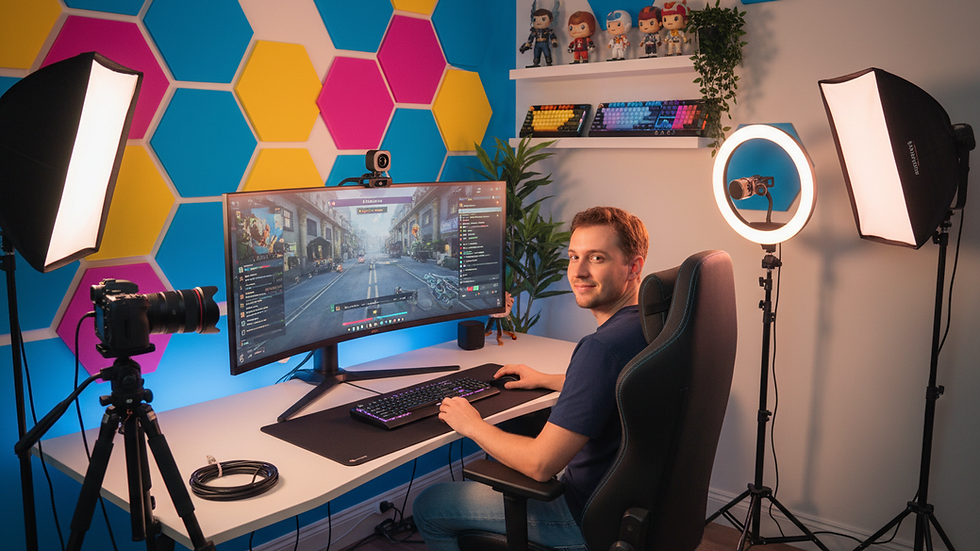
A professional webinar setup is more than just having a camera and microphone. It involves careful planning, technical preparation, and thoughtful design of the webinar environment. When you invest time and resources into setting up your webinar professionally, you create a positive impression on your audience and increase engagement.
For example, consider the impact of clear audio and video quality. Poor sound or blurry visuals can distract attendees and reduce their willingness to stay connected. On the other hand, a well-lit room, high-quality microphone, and stable internet connection contribute to a polished presentation. Additionally, using reliable webinar software with interactive features such as polls, Q&A, and chat enhances participant involvement.
To achieve this level of professionalism, many businesses collaborate with an online webinar setup company that specializes in digital and audiovisual solutions. Such partners can simplify the technical complexities and provide tailored support to meet your specific needs.

Key Elements of a Professional Webinar Setup
When preparing your webinar, focus on these essential elements to ensure a professional setup:
1. Technical Equipment
Camera: Use a high-definition webcam or a professional camera to capture clear video.
Microphone: Invest in a quality microphone to deliver crisp and clear audio.
Lighting: Position soft, diffused lighting to avoid harsh shadows and illuminate your face evenly.
Internet Connection: Ensure a stable and fast internet connection to prevent interruptions.
2. Software and Platform
Choose a webinar platform that supports your goals. Look for features such as:
Screen sharing
Interactive polls
Chat and Q&A functions
Recording capabilities
Integration with email marketing tools
3. Environment and Background
Create a distraction-free environment with a clean, professional background. Avoid clutter and ensure good acoustics to minimize echo.
4. Presentation Materials
Prepare slides, videos, or other visual aids that are clear, concise, and visually appealing. Use consistent branding to reinforce your business identity.
5. Rehearsal and Testing
Conduct a full rehearsal to test all equipment and software. Check audio levels, video quality, and internet stability. Practice your presentation to build confidence and smooth transitions.
Crafting Engaging Content for Your Webinar
Content is the heart of your webinar. To keep your audience engaged, your material must be relevant, informative, and well-structured. Here are some strategies I recommend:
Start with a strong introduction that outlines what attendees will learn and why it matters.
Use storytelling to make your points relatable and memorable.
Incorporate interactive elements such as polls or quizzes to maintain attention.
Break content into digestible segments with clear transitions.
Include real-life examples and case studies to demonstrate practical applications.
End with a compelling call to action that encourages participants to take the next step.
Remember, your goal is to provide value while maintaining a professional tone that reflects your business’s expertise.

Managing Audience Engagement and Interaction
Engagement is critical for a successful webinar. Passive listeners are less likely to retain information or act on your message. To foster interaction, consider these approaches:
Welcome attendees warmly as they join and encourage them to introduce themselves in the chat.
Use polls and surveys to gather opinions and keep the session dynamic.
Allocate time for Q&A to address participant questions and concerns.
Respond promptly to chat messages to create a conversational atmosphere.
Encourage feedback at the end to improve future webinars.
By actively involving your audience, you build trust and create a more memorable experience.
Post-Webinar Follow-Up and Analysis
The work does not end when the webinar finishes. Effective follow-up is crucial to maximize the impact of your event and nurture leads. Here are some best practices:
Send a thank-you email with a link to the webinar recording and additional resources.
Provide a feedback survey to learn what worked well and what can be improved.
Analyze attendance data to understand participant behavior and engagement levels.
Segment your audience based on their interaction and tailor follow-up communications accordingly.
Plan next steps such as scheduling one-on-one consultations or offering special promotions.
This systematic approach helps you build lasting relationships and measure the return on your webinar investment.
Partnering with Experts to Simplify Your Webinar Setup
Starting your online webinar the right way can be complex, especially when managing multiple technical and logistical aspects. Collaborating with a professional online webinar setup company can ease this burden. These experts bring experience, equipment, and technical know-how to ensure your webinar runs flawlessly.
They can assist with:
Equipment selection and setup
Platform configuration and integration
Live technical support during the event
Post-webinar analytics and reporting
By leveraging their expertise, you can focus on delivering your message confidently while they handle the technical details.
Starting your online webinar the right way requires careful planning, professional setup, engaging content, and attentive follow-up. By prioritizing these elements, you position your business to communicate effectively and achieve your digital goals. Whether you manage the process internally or partner with specialists, a professional webinar setup is the foundation of a successful online event.


Comments